How to Opt In to Job Alerts in South Africa (and Stay Safe)
28 October 202614 min read

Contents16 sections
- 1TL;DR
- 2Table of Contents
- 3What a job alert is, and what opting in means
- 4The three choices that decide whether alerts are useful
- 5How to opt in, step by step
- 6Opting in on WhatsApp
- 7Check the alert before you act on it
- 8Protect your personal information
- 9How to change or stop job alerts
- 10Our perspective: fewer barriers, more safety
- 11Get new vacancies every morning
- 12A simple setup you can copy
- 13Common mistakes to avoid
- 14FAQ
- 15Sources
- 16Recommended
How to Opt In to Job Alerts in South Africa (and Stay Safe)
To opt in to job alerts, you choose a channel (WhatsApp, email or SMS), tell the service which jobs and which place you want, and confirm that you agree to receive messages. Then you decide how often they arrive. Do it in that order and you get a short, relevant list each day instead of a noisy stream. This guide walks through each step for South African job seekers, shows how to change or stop alerts later, and explains how to check that an alert is real before you hand over any personal details.
TL;DR
- An opt-in alert needs three choices: the channel, the kind of job and location, and the frequency.
- Be specific. A city or province plus one job type beats a broad “any job” alert every time.
- Under POPIA, electronic marketing needs your consent, so you should always be able to say yes, and later say no, on your own terms.
- A real vacancy never asks you to pay. Fees for “verification”, “uniforms” or “registration” are the classic scam.
- On FindJobsZA you can browse by city or job type without a CV upload or sign-up, and get new listings on WhatsApp every morning.
Table of Contents
- What a job alert is, and what opting in means
- The three choices that decide whether alerts are useful
- How to opt in, step by step
- Opting in on WhatsApp
- Check the alert before you act on it
- Protect your personal information
- How to change or stop job alerts
- Our perspective: fewer barriers, more safety
- Get new vacancies every morning
- A simple setup you can copy
- Common mistakes to avoid
- FAQ
- Sources
What a job alert is, and what opting in means
A job alert is a message that tells you about new vacancies matching something you asked for. It can be a WhatsApp message, an email, an SMS or a phone notification. Some alerts are based on a saved search (for example, “admin jobs in Pretoria”). Others are a daily digest of everything new in a region.
Opting in simply means you actively asked for those messages. Nobody added you to a list. That matters for two reasons. First, you get what you wanted. Second, it is the law: South Africa’s data protection rules treat electronic marketing differently from post or face-to-face contact. According to a legal guide to direct marketing under POPIA, electronic marketing needs consent or an existing customer relationship, while post and in-person marketing can rely on legitimate interest with a right to opt out. So if a service starts messaging you without you ever asking, that is a warning sign, not a perk.

The three choices that decide whether alerts are useful
Most people tick “yes” and then wonder why their phone is full of jobs they cannot take. The fix is to decide these three things first.
1. Where the alerts arrive
Pick the channel you actually check.
| Channel | Works well if | Watch out for |
|---|---|---|
| You check your phone many times a day and data is tight | Messages can get buried; mute other noisy chats | |
| You want a record you can search and a CV-ready inbox | Alerts land in spam or promotions; check those folders | |
| SMS | You have a basic phone or patchy data | Short text, so less detail; check for costs |
| App notification | You job hunt daily on one device | Easy to dismiss and forget |
For many South Africans, WhatsApp is the easiest choice because it works on low data and most people already open it first thing. If that sounds like you, our guide to joining WhatsApp job channels safely explains how to tell a trustworthy channel from a random group.
2. What you want to be told about
This is where most of the value sits. Set at least these details:
- Job type or category. Sales, retail, customer service, admin, logistics, driving, human resources or finance are all common starting points. Choose one or two, not eight.
- Location. A city, town or province. Commuting costs and taxi fares make “anywhere in South Africa” unrealistic for most entry-level roles. Use the place you can actually get to.
- Work type. Full-time, part-time, freelance or entry-level. Students often want part-time only; graduates want entry-level; remote workers want remote only.
- Keywords. A job title such as “cashier”, “driver” or “receptionist” beats a vague word such as “work”.
A worked example: Thando is a recent graduate in Centurion. She sets an alert for entry-level customer service jobs in Centurion and nothing else. She gets a few relevant vacancies a day and can apply to each within minutes. If she had picked “all jobs in Gauteng”, she would have scrolled past hundreds of roles she cannot reach or is not qualified for. You can see how that looks on our customer service jobs in Centurion page.
3. How often
Most services offer instant, daily or weekly alerts. A simple rule:
- Daily if you are actively looking. New vacancies often close within days, so waiting a week costs you chances.
- Instant only for narrow, competitive searches, such as one specific job title in your suburb.
- Weekly if you are employed and only browsing.
A morning delivery works well because you can read the list with your first coffee, apply before lunch, and be among the first CVs the employer sees. Our city job alerts guide shows how to get local vacancies every day without sifting through national listings.
How to opt in, step by step
The exact buttons differ between services, but the process is nearly always the same.
- Go to the service’s own website or official page. Type the address yourself or use a link you trust. Do not opt in through an unknown forwarded link.
- Choose your job type and location. Use the filters first, then look for a “get alerts”, “follow” or “subscribe” button.
- Choose your channel. For WhatsApp, this usually means following a channel or confirming your number. For email, you enter your address and confirm through a link sent to you.
- Read what you are agreeing to. Check whether your details are shared with third parties and how to leave. If the page says nothing about it, think twice.
- Confirm the opt-in. A proper service asks you to confirm, so nobody can sign you up with your number or address by mistake.
- Check the first alert. It should match what you asked for. If it is something unrelated, or asks for money, leave straight away.
Using the government’s free service
If you want a state-run option, the Department of Employment and Labour’s Public Employment Services branch offers free services, including registering work seekers on ESSA, an online job-matching platform, as set out in a government statement on job scams. Registration is free. It is a good complement to private alerts, especially if you want to be matched to roles rather than browse.
Opting in on WhatsApp
WhatsApp has become a main route for job tips in South Africa, which is also why scammers love it. When you follow a channel, you control the notifications. WhatsApp’s own help page explains that when you unfollow a channel, you stop getting update notifications and the channel disappears from your Updates tab.
Some practical tips:
- Follow channels, not random groups. A group lets strangers see your number and message you.
- Check that the channel links to a real website with real vacancy pages you can open without logging in.
- Never reply to a number that messages you privately after you follow. Real job channels broadcast; they do not ask you to send your ID.
- Mute a channel if it posts too much, rather than leaving it, if you may want it later.
Check the alert before you act on it
Opting in solves the “who is messaging me” problem. It does not guarantee that every vacancy is real. Scammers copy genuine adverts and swap in their own contact details.
Signs of a fake vacancy
- You are asked to pay for anything: application, “verification”, medical, uniform, training or a “security clearance”.
- The contact is a free email address or a personal WhatsApp number, rather than a company domain.
- The advert promises high pay for no experience or qualifications.
- You are told to apply through a website that is not the employer’s own.
The Department of Public Works and Infrastructure warned of a jobs scam in which applicants applied on a fake website and were then asked for a purported verification fee. That pattern, apply first and pay later, is the one to remember. The same government statement on ESSA cited above was issued to warn the public about scammers, so the message is consistent: official channels do not charge job seekers.
A four-step check
- Find the employer’s official website yourself and look for the same vacancy.
- Compare the contact details in the alert with those on that website.
- Search the company name with the word “scam” and read what comes up.
- Apply only through the employer’s own system or a listing page that clearly shows the company name.
If you spend a lot of time on social media, read our breakdown of what is real and what is a scam in Facebook hiring posts as well.
Protect your personal information
An alert should never need more than your number or email address. A name and a location can help with matching, but you should not hand over your ID number, banking details or a copy of your ID just to receive vacancies. Share a CV only when you apply to a specific, verified employer.
Be careful with these in particular:
- ID number and ID copy. Employers ask for it at the offer stage, not at the “get alerts” stage.
- Banking details. Only when you have signed a contract and are being onboarded.
- One-time PINs (OTPs). Never share an OTP with anyone who contacts you about a job.
How to change or stop job alerts
You should be able to leave as easily as you joined.
- Email: use the unsubscribe link at the bottom of any message, or change preferences in your account if you have one.
- WhatsApp channel: open the channel, tap its name and unfollow, or mute it if you only want a break. See WhatsApp’s help page for the current steps on your phone.
- SMS: reply with the stop word given in the message, if the sender offers one, and check you are not charged.
- Changing preferences: if you move cities or change careers, update the location and job type instead of leaving. If the service has no preference settings, unfollow and follow again with the new choice.
If a sender ignores your request to stop, that is a data protection issue. Keep a screenshot and take it up with the sender first. The Information Regulator is the body that deals with unresolved POPIA complaints.
Our perspective: fewer barriers, more safety
We built FindJobsZA because we saw how tiring job hunting has become. Most job seekers we hear from are not short of adverts. They are short of time, data and trust. They have to create profiles, upload the same CV five times, and then sit in WhatsApp groups where vacancies are mixed with chain messages and the occasional scam.

That is why we do things differently. You can browse jobs by city, province or job type without a CV upload or registration. You can get the new listings every morning on WhatsApp. We want you to see the job first and decide afterwards whether to apply.
Our advice, after all of that, is simple. Choose one place and one job type. Read the alerts for a week. If they are not useful, narrow or change them. And never pay anyone for a job. If anyone asks, close the chat.
— Nkosi
Get new vacancies every morning
If you would like a daily list without creating a profile, start on the FindJobsZA home page. Browse by job type (sales, retail, customer service, admin, logistics, driver, human resources and finance) or by your city, then follow our WhatsApp updates for new listings each morning. It costs job seekers nothing.
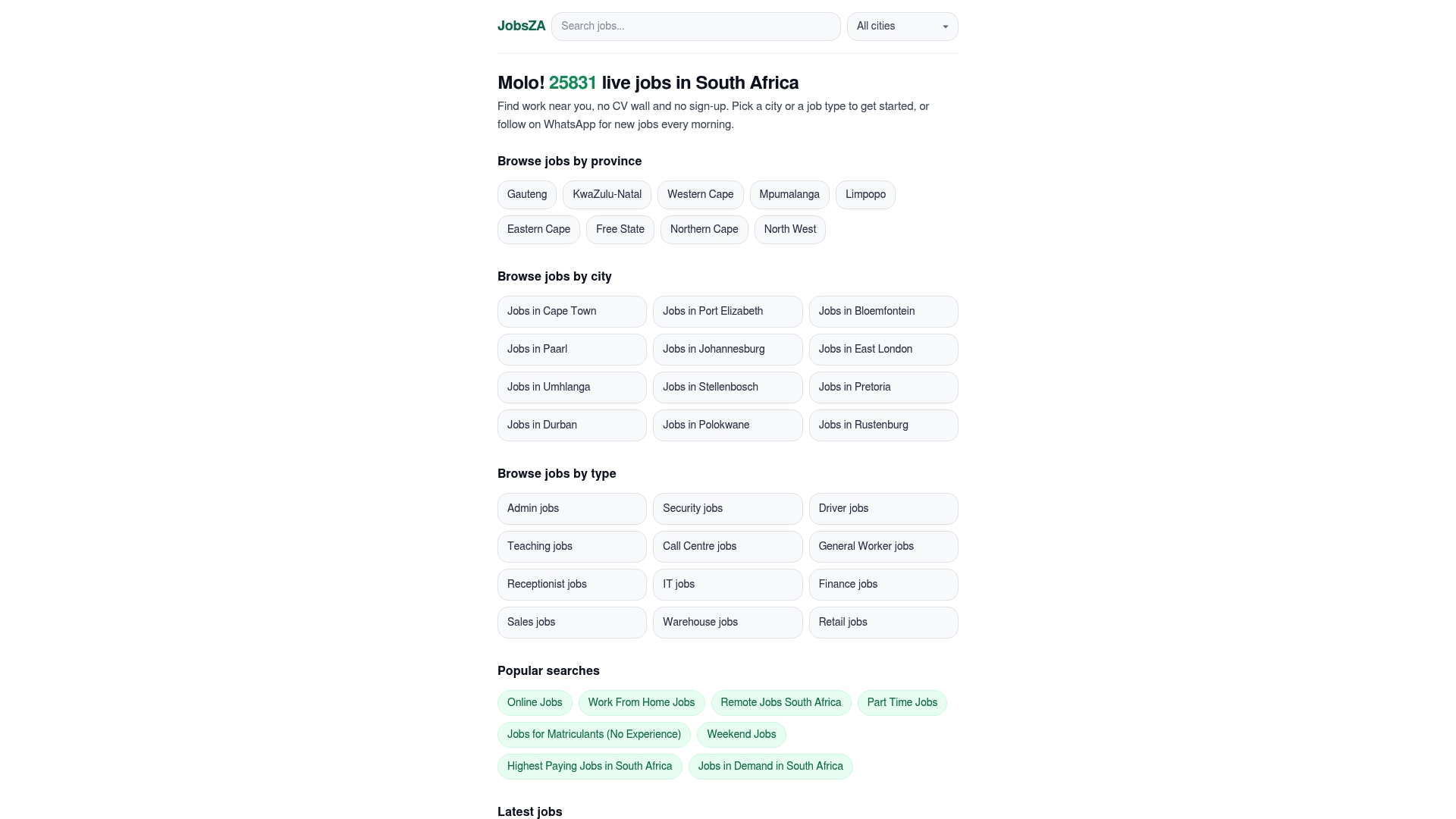
If you already know your area, go straight to the listings. Customer service has 694 vacancies in Johannesburg at the time of writing, and teaching roles are listed for Cape Town and Pretoria. Counts change daily, so open the page to see what is live now.
A simple setup you can copy
If you are not sure where to begin, use this starting point and adjust after a week.
| If you are… | Alert for | Frequency |
|---|---|---|
| A student | Part-time retail or customer service in your town | Daily |
| A recent graduate | Entry-level roles in your field, in one or two cities | Daily |
| A freelancer | Short-term or freelance work in your category | Daily, or instant for narrow searches |
| A professional open to a move | Your job title, in your city or remote | Weekly |
| A driver or logistics worker | Driver or logistics roles near your home | Daily |
Review it every two weeks. If you are getting more than you can read, narrow the location. If you are getting nothing, widen the job type before you widen the distance.
Common mistakes to avoid
- Opting in everywhere. Five services with the same vacancies just means five notifications for one job.
- Using a primary email address with a serious tone only. Create a clean, professional address for job hunting so your personal inbox stays calm.
- Ignoring the spam folder for the first few days. Confirmation emails often land there.
- Applying late. The first days of an advert are the best. Read and act on alerts the same day.
- Replying to the alert itself. Always apply through the employer’s route, not by messaging the sender back.
FAQ
Is it free to opt in to job alerts?
It should be. A legitimate job alert service does not charge job seekers to receive vacancies. If anyone asks for money to “activate” your alerts or to be placed in a job, treat it as a scam and stop. Government warnings on job scams repeatedly describe fees as the red flag.
Do I need to upload my CV to get job alerts?
No. Alerts only need a way to reach you and your preferences. You need a CV when you apply, and then only for the employer you are applying to. On FindJobsZA you can browse and get alerts without a CV upload or sign-up.
How often should job alerts arrive?
If you are actively looking, daily is the sweet spot because vacancies close quickly. Instant alerts suit very narrow searches. Weekly summaries suit people who are already employed and only browsing.
How do I stop job alerts I no longer want?
For email, use the unsubscribe link in the message. For a WhatsApp channel, open it and unfollow, or mute it if you want a pause. If a sender keeps messaging you after you opted out, raise it with them in writing and keep the evidence.
Can someone opt me in without my knowledge?
It should not happen. Electronic marketing in South Africa depends on your consent, and a good service asks you to confirm before it starts. If you receive vacancies you never requested, do not click the links and do not reply.
Sources
- Direct marketing under POPIA: regulated, not banned
- Public Works and Infrastructure warns of a jobs scam (gov.za, 2 October 2023)
- How to unfollow a WhatsApp channel (WhatsApp Help Centre)
Recommended
Start with your city.
28 159 live jobs, filtered by city and suburb. No sign-up wall, no CV upload just to look.