Get 15–25% Replies With One Short Cold Email, Templates for SA
2 September 202613 min read

Contents13 sections
- 1Table of Contents
- 2What makes a cold email for jobs actually work
- 3What subject lines and openers get the most replies?
- 4How do you find the right person to email?
- 5Five cold email templates you can copy right now
- 6When and how often should you follow up?
- 7Should you attach your CV to a cold email?
- 8Before and after: three cold email rewrites that actually work
- 9Pairing outreach with real-time job alerts
- 10Why a plain, respectful email still beats a polished one
- 11Turn today’s listings into tomorrow’s outreach targets
- 12Sources
- 13FAQ
Get 15–25% Replies With One Short Cold Email, Templates for SA
Send a short, personalised email that references something real happening at the company, then ask for a 15-minute conversation. Keep it under 125 words, skip the resume attachment, and follow up once, 5 to 7 business days later, if you hear nothing. That’s the whole game. Everything else in this guide is how to build that message well and use it consistently.
TL;DR:
- Cold emails that reference a recent company trigger or project improve relevance and response likelihood over generic messages.
- Personalizing the opening line with specific details about the company’s recent activities is crucial to capturing attention within seconds.
- Keeping the initial message concise and asking for a small, low-friction call increases the chances of a reply compared to lengthy or vague inquiries.
- Follow-up emails should be sent only once after 5 to 7 business days, adding new information to re-engage without overdoing outreach.
- Supplying your CV only upon request, with a clear filename and minimal attachments, reduces friction and spam filtering issues.
Table of Contents
- What makes a cold email for jobs actually work
- What subject lines and openers get the most replies?
- How do you find the right person to email?
- Five cold email templates you can copy right now
- When and how often should you follow up?
- Should you attach your CV to a cold email?
- Before and after: three cold email rewrites that actually work
- Pairing outreach with real-time job alerts
- Why a plain, respectful email still beats a polished one
- Turn today’s listings into tomorrow’s outreach targets
- Sources
- FAQ
What makes a cold email for jobs actually work
Every sentence in a cold email for jobs has one job to do, and most people waste half their sentences doing nothing. A hiring manager reads for maybe eight seconds before deciding whether to keep going. If your email doesn’t earn each line, it dies in that window.
Here’s the structure that survives that eight-second test:
- Subject line — tells them why this email is different from the other forty in their inbox.
- Opening line — proves you know something specific about their team, not just their company name.
- Relevance line — one sentence connecting who you are to what they need.
- Call to action — a single, low-friction ask.
- Signature — name, role, one link. Nothing else.
The subject line’s only job is to survive the preview pane. It doesn’t need to be clever. It needs to be specific enough that the recipient can guess what’s inside before opening it.
The opening line is where most cold emails collapse. “I came across your company and was impressed by your work” could describe literally any company on Earth. Compare that to referencing an actual product launch, a job posting that just went up, or a LinkedIn post the hiring manager wrote last week. That’s strategic empathy in practice: matching their language and citing a real priority, not just proving you can spell their company’s name.
The relevance line is where you connect your background to their trigger, in one sentence. Not three. Not a paragraph. One.
The call to action has to ask for something small. “Would you be open to a 15-minute call this week?” costs the reader almost nothing to say yes to. “Let me know if there are any opportunities” asks them to do your job for you, and they won’t.
Your signature should carry your name, your current or most relevant role, and one link, either LinkedIn or a portfolio. Skip the phone number, the tagline, the inspirational quote.
On length: aim for a concise message, keeping it short and focused to respect the recipient’s time. Cold emails to hiring managers see response rates of 15 to 25%, compared with 2 to 5% for standard online applications, and the short, targeted format is a big part of why that gap exists.
Pro Tip: Write your draft, then delete the first sentence entirely. Nine times out of ten, your email actually starts stronger on sentence two.
What subject lines and openers get the most replies?
Three subject-line formulas consistently outperform generic ones, because they signal specificity before the email is even opened.
- Role plus credential: “Frontend Developer, 3 Years React — Quick Question”
- Trigger reference: “Saw the Cape Town Office Opening”
- Mutual connection: “Thabo Mokoena Suggested I Reach Out”
Vague subjects like “Job Opportunity” or “Following Up” get buried, partly because inboxes truncate subject lines around 40 to 60 characters on mobile. If the meaningful part of your subject line is sitting past that cutoff, half your recipients never see it.
Openers need the same specificity. Here’s how they shift by who you’re emailing:
- To a hiring manager: “I noticed your team’s post about the new logistics platform launching next quarter.”
- To a recruiter: “I saw you’re sourcing for the operations analyst role posted this week.”
- To a founder: “Congratulations on the funding round. It looks like you’re scaling the support team fast.”
- Through a referral: “Lerato Dlamini mentioned your team is expanding and suggested I reach out directly.”
Before sending anything, run a 20-second check: could this subject line and opener apply to any other company if you swapped the name? If yes, it’s not specific enough yet.
How do you find the right person to email?
The decision is simpler than it feels. If a role is posted and has a named recruiter attached, start there. If the role is unlisted, or you’re reaching out speculatively, go straight to the hiring manager or team lead. Recruiters filter volume; hiring managers make the actual call.
Finding the person takes three main sources:
- LinkedIn — search the company, filter by department, and look for anyone with “manager,” “lead,” or “head of” in the title for your target function.
- Company careers pages — some list the hiring manager or team lead directly on the job posting.
- Recent blog posts, press releases, or product announcements — these often name the exact person leading the initiative you want to reference in your opener.
Once you have a name, verifying the email address is usually faster than people expect. Most companies follow a predictable pattern (first.last@company.com, first initial plus last name, and so on), which you can often confirm by checking a few existing public email addresses from press mentions or company sites. A general careers@ inbox works as a fallback, though it gets far less individual attention than a named contact.
Keep a simple tracking sheet: company, contact, date sent, follow-up date, response. It takes two minutes to set up and saves you from the awkward mistake of emailing the same person twice within a month.
Five cold email templates you can copy right now
Each template below runs 50 to 125 words. Swap the bracketed sections, and cut anything that doesn’t apply to your situation.
-
Template A — Applying to an open role. Lead with the exact job title and where you saw it, then one sentence on a result that matches what the listing asks for. Personalise the hook by naming a specific requirement from the posting, not the job title alone. End with: “Would you be open to a quick call this week to see if it’s a fit?”
-
Template B — Speculative outreach, no open role. Cite a concrete trigger, a funding announcement, a new product, an expansion into a new city, and connect it to a problem you’ve solved before. This is where strategic empathy matters most, since there’s no job posting doing the relevance work for you.
-
Template C — Recruiter outreach. Keep it tighter than the others. State your target role or two, one credential, and ask an option-oriented question: “Are you currently sourcing for anything in this space, or is it worth checking back in a few months?”
-
Template D — Career switch. Lead with the transferable result, not your old job title. If you managed a team of ten in retail and you’re moving into operations, say the ten, not the retail.
-
Template E — The single follow-up. Reference the first email briefly, then add one new piece of information, an availability window, a recent project, a fresh trigger you noticed since sending the original message.
For all five, remove any sentence that describes your general career goals. Add a specific number wherever possible: team size, revenue impact, time saved, users served.
When and how often should you follow up?
Send exactly one follow-up, 5 to 7 business days after your first message. That window is long enough to avoid looking impatient and short enough that your original email hasn’t gone cold in their memory.
Your follow-up should do two things: remind them briefly of the original ask, and add something new. That could be a fresh trigger you spotted since your last email, an update on your availability, or a short note on a relevant project you just finished.
- Never send more than two total messages without a real reason to reset the conversation.
- If both go unanswered, stop. Silence is an answer.
- Re-engage after 60 to 90 days only if you have a genuinely new reason to reach out, not just a repeat of the same pitch.
- Log every send and follow-up date in your tracking sheet so you never accidentally message the same person twice in the same month.
Should you attach your CV to a cold email?
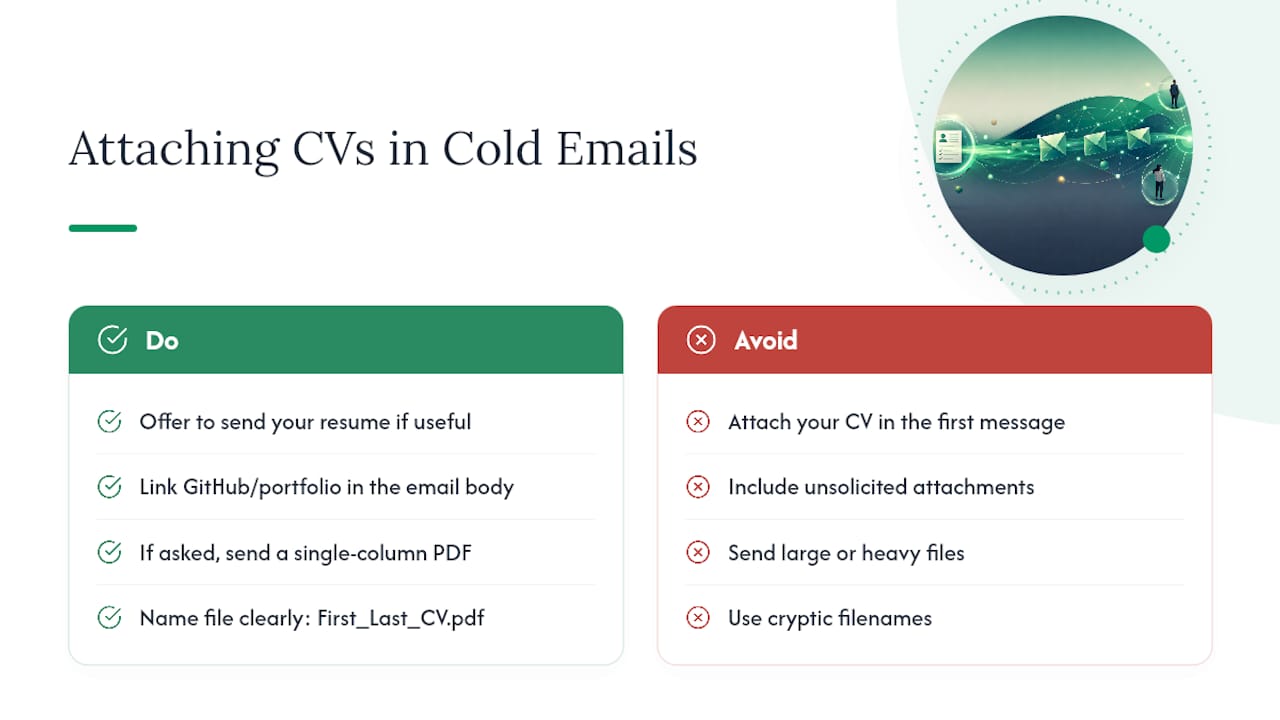
Don’t attach your CV on the first message. Unsolicited attachments create friction, they can trigger spam filters, and they shift the email’s purpose from “start a conversation” to “please review my application,” which is a much bigger ask. A single line offering to send it works better: “Happy to send my resume or a portfolio if that’s useful.” One study on attachment friction backs this pattern directly.
If they ask for it, send a single-column PDF, keep the file size small, and name it clearly (FirstName_LastName_CV.pdf, nothing cryptic). If you’re sharing work samples instead of a full resume, link to a public GitHub or portfolio page and mention it in the body of the email rather than bundling it as a separate attachment. Fewer clicks between “open email” and “see proof” almost always beats a heavier file.
Before and after: three cold email rewrites that actually work
Small edits separate a message that gets ignored from one that gets a reply. Three examples show the pattern.
Generic to specific. Before: “I’m currently seeking new opportunities and would love to learn more about your team.” After: “I saw your team just launched the new mobile checkout flow. Open to a quick call this week?”
Long to compact. A four-paragraph cover-letter-style email describing career history top to bottom becomes three sentences: the trigger, the one relevant result, and the ask. Everything else gets cut.
Speculative outreach with an intro ask. Instead of asking “Do you have any openings?”, the rewrite asks: “Would you be willing to introduce me to whoever leads the design team, or point me to the right person?” That’s a smaller, easier yes.
Run your own draft through this checklist:
- Cut any sentence that could apply to a different company.
- Cut your career summary if it runs more than one sentence.
- Make sure the ask is something they can say yes to in under a minute.
Pairing outreach with real-time job alerts
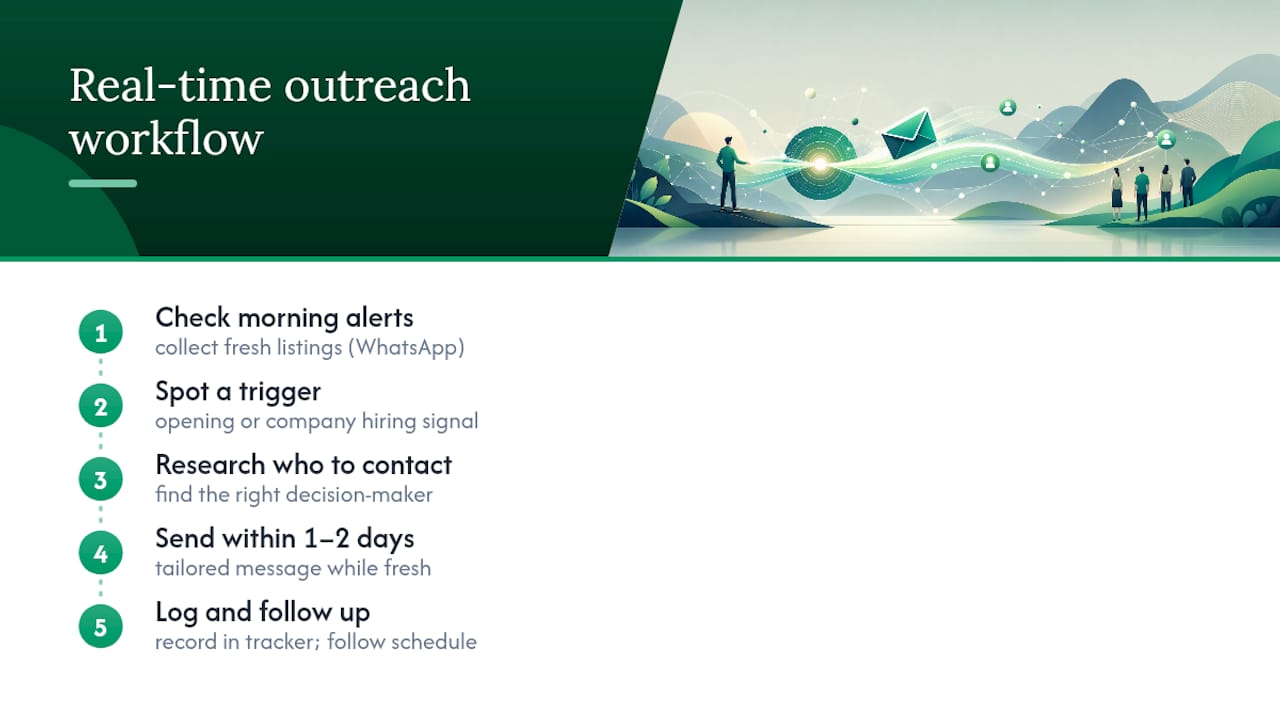
A cold email for jobs works best when it’s built around something happening right now, not a cold guess. That’s where a daily habit of checking fresh listings pays off. The workflow is simple: spot an interesting opening or company signal, research who to contact, send a tailored message within a day or two while the trigger is still current, then log it and follow up on schedule.
Checking WhatsApp job alerts each morning gives you a running list of companies that are actively hiring right now, which is exactly the kind of trigger strategic empathy depends on. A company hiring three new roles this week is a stronger hook than one you found through a random search three months ago.
Pro Tip: Batch your outreach on set days rather than sending emails the moment you spot a trigger. You’ll write sharper, more personalised messages when you’re not rushing, and your tracking sheet stays cleaner.
Why a plain, respectful email still beats a polished one
The candidates who get replies aren’t the ones with the cleverest subject line. They’re the ones who clearly did five minutes of homework and respected the reader’s time enough to say it in four sentences instead of fourteen. That’s not a trick, it’s just consideration, and most job seekers skip it because it’s slower than mass-applying.
Track what you send and what gets replies, then adjust your openers and subject lines based on what actually lands, not what feels clever in the moment. Keep every message honest about who you are and what you’re asking for. Outreach that respects the reader’s time tends to earn a response precisely because so little of it does.
— Nkosi
Turn today’s listings into tomorrow’s outreach targets
Findjobsza gives you the daily raw material a strong cold email needs: fresh listings and company movement you can actually reference, delivered without the usual grind of CV uploads or account sign-ups. Browsing by city or job type on Findjobsza surfaces the kind of specific detail, a new role, a hiring push, a growing team, that turns a generic email into one that gets opened.
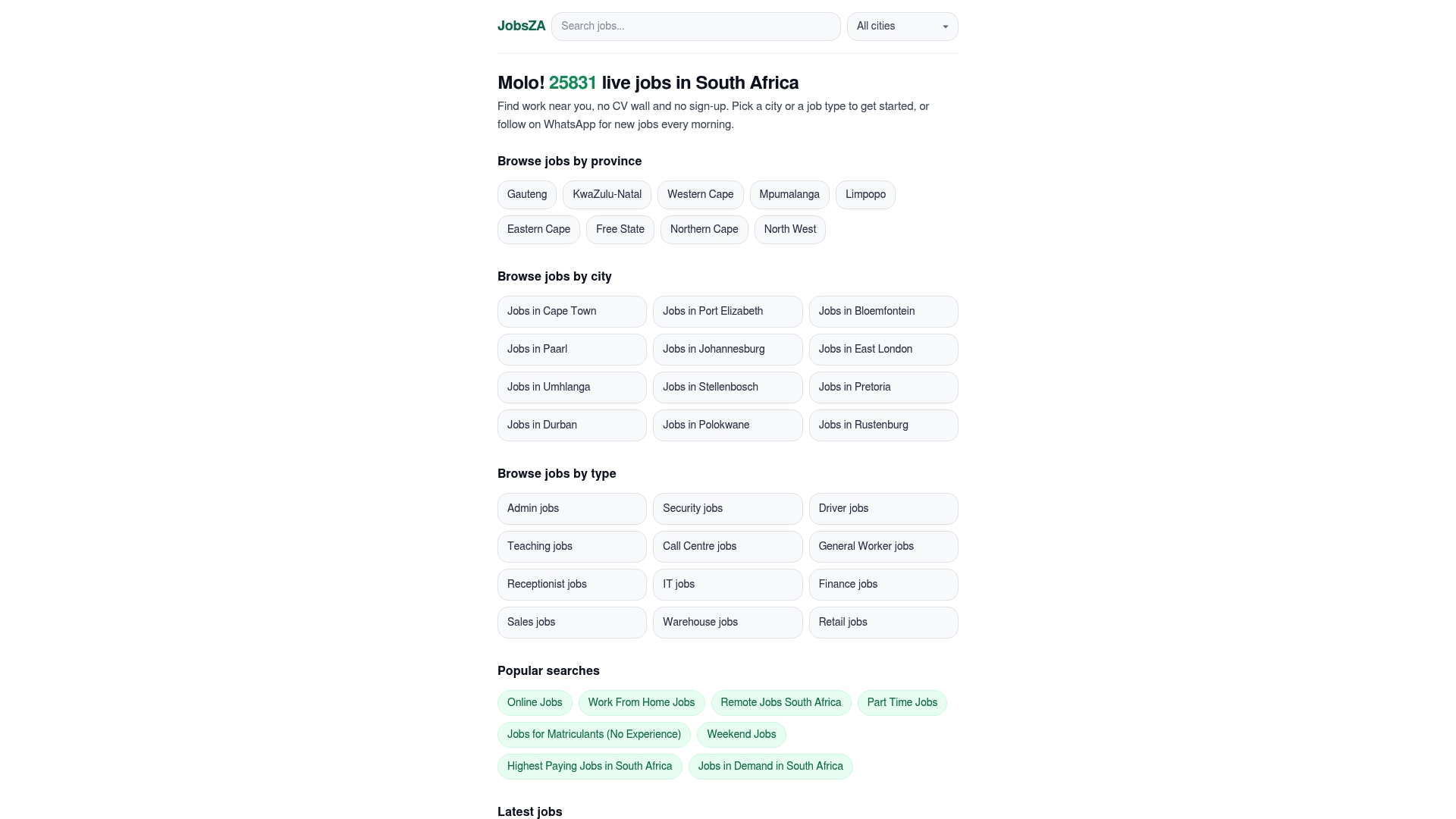
The daily WhatsApp alerts do double duty here. They flag new listings each morning, which means you’re often among the first to spot an opening worth writing about before it gets buried under a hundred other applications. If you’re weighing flexible or remote options as part of your search, the remote jobs listings and weekend jobs listings are worth checking alongside your outreach targets. Pick a city or category on Findjobsza this morning, find one listing worth writing about, and send your first email before lunch.
Sources
- Cold Email for a Job: How to Write One That Actually Gets a Reply
- Cold Emailing for Jobs: The 2026 Guide to Get Hired | Draftery Blog
FAQ
What should you write in a cold email for a job?
Reference a specific, current trigger at the company, connect it to one relevant result from your own background, and ask for a short call. Keep the entire message between 50 and 125 words.
Should you attach your CV to a cold email?
No. Attaching a resume unprompted adds friction and can trigger spam filters; offer to send it in one line instead and attach it only once they ask.
How do you send a CV by email the right way?
Once someone requests it, send a single-column PDF with a clear file name, and keep the email body short since the file itself does the talking.
Is it okay to cold email someone for a job?
Yes. Cold emails sent directly to hiring managers see 15 to 25% response rates, compared with 2 to 5% for standard online applications, making direct outreach one of the more effective job-search tactics available.
How many times should you follow up after a cold email?
Send one follow-up, 5 to 7 business days after your first message, and stop after two total messages if you get no response.
Start with your city.
24 497 live jobs, filtered by city and suburb. No sign-up wall, no CV upload just to look.