South Africa Remote Job Alerts That Actually Work via WhatsApp and Email
13 September 20269 min read

Contents11 sections
- 1Table of Contents
- 2Why remote job alerts matter more than manual searching
- 3How to set up effective remote job alerts
- 4Email, WhatsApp, SMS, or push: which channel actually gets you hired first
- 5Fixing the most common alert problems
- 6Why FindJobsZA’s alert setup gets South African job seekers hired faster
- 7Running your alerts week to week
- 8Get FindJobsZA’s remote job alerts working for you today
- 9Sources
- 10FAQ
- 11Recommended
South Africa Remote Job Alerts That Actually Work via WhatsApp and Email
The best setup is layered: a tight daily alert for your exact job title, a broader weekly digest to catch what you missed, and a fast channel like WhatsApp for time-sensitive openings, in addition to standard email. For South African job seekers, FindJobsZA is a direct option built around this exact model, with real-time WhatsApp updates each morning. Start now: create one tight alert, add a company-specific alert for a dream employer, and turn on WhatsApp notifications today.
TL;DR:
- Effective remote job alerts should include a direct daily alert for your exact role and a broader weekly digest to catch roles you might miss.
- Real-time WhatsApp notifications deliver new listings each morning, providing a crucial first-mover advantage before most applicants see the posting.
- Filtering alerts by salary floor, contract type, and specific companies helps refine relevance and avoid irrelevant or duplicate listings.
- Combining email and WhatsApp communication modes allows quick responses to urgent opportunities while keeping organized records.
- Using platforms like FindJobsZA, which offer immediate browsing and real-time updates without sign-up barriers, enhances the chances of landing applications faster.
Table of Contents
- Why remote job alerts matter more than manual searching
- How to set up effective remote job alerts
- Email, WhatsApp, SMS, or push: which channel actually gets you hired first
- Fixing the most common alert problems
- Why FindJobsZA’s alert setup gets South African job seekers hired faster
- Running your alerts week to week
- Get FindJobsZA’s remote job alerts working for you today
- Sources
- FAQ
Why remote job alerts matter more than manual searching
Recruiters move fast, and remote postings move faster. A remote role often draws applicants from multiple time zones within hours, so the listing that stays open for a week on a local job board might close in a day once it goes remote. Smart job alerts give you first-mover advantage: you get notified the moment a matching role appears, often before most candidates even see it.
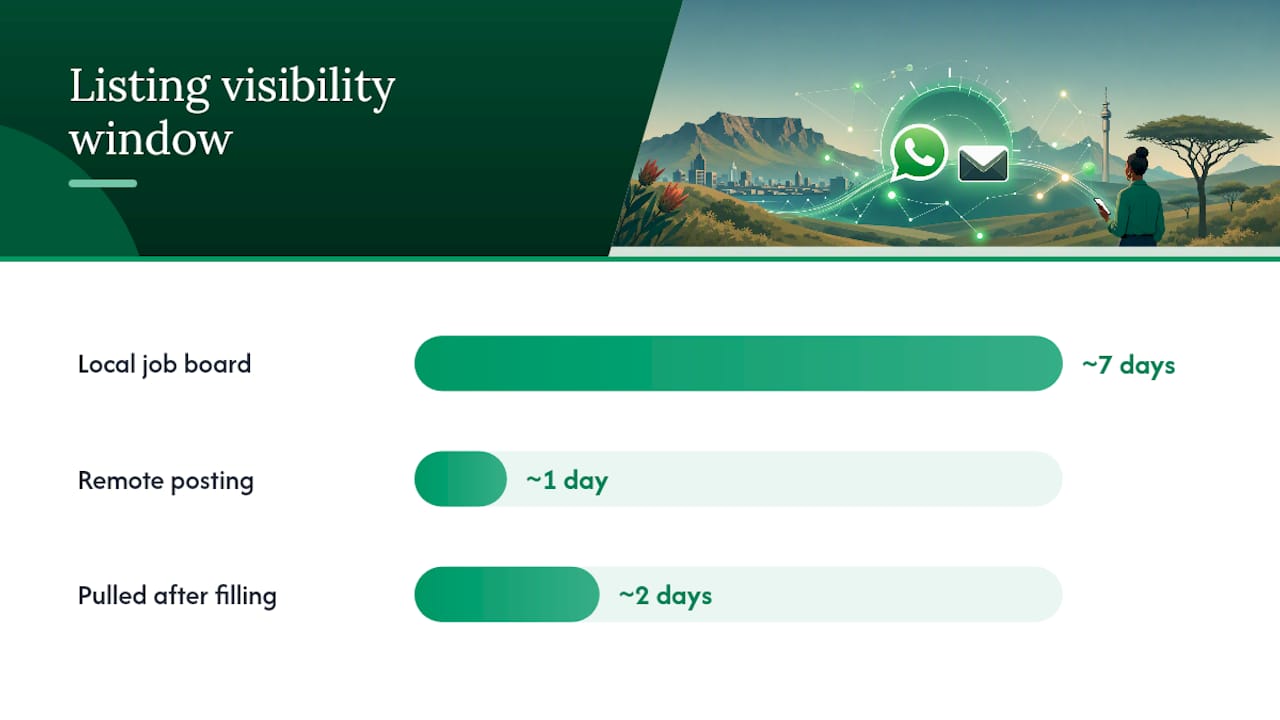
That timing gap is the whole game. A hiring manager reviewing the first 20 applicants gives each one real attention. Applicant 200 gets a skim, if that. Alerts close what recruiters call the response gap, the lag between a job going live and a job seeker finding it.
For remote work specifically, this matters even more:
- Remote listings often get pulled once a role fills, sometimes within a couple of days.
- Companies hiring across time zones frequently post overnight relative to your local time.
- Competition is global, not local, so delay costs you more applicants ahead of you, not fewer.
Waiting to check job boards manually means you’re always searching yesterday’s listings.
How to set up effective remote job alerts
Building a good alert system isn’t about signing up for every notification you can find. It’s about designing a small set of alerts that do specific jobs.
- Set your primary alert. Use your exact job title (not a broad category) and set location to “Remote.” Dedicated alerts using your job title with Remote as the location consistently outperform generic searches, and a daily frequency usually balances speed against inbox fatigue.
- Add a secondary, broader alert. Widen this one with synonyms and adjacent titles (“Customer Success Manager” plus “Client Success Lead,” for example), and run it weekly instead of daily. Best practice pairs one tight daily alert with a broader weekly digest for exactly this reason: it catches roles your exact-match alert misses without flooding your inbox.
- Create company-specific alerts. Pick three to five employers you’d genuinely want to work for and set individual alerts for their openings.
- Set a salary floor, not a ceiling. Filtering out anything below your minimum acceptable pay keeps junior or underpaid roles out of your feed without excluding higher-paying surprises.
- Filter by contract type. Split full-time, contract, and freelance into separate alerts if you’re open to more than one arrangement, since mixing them muddies your results.
Pro Tip: Run a 4-week audit on every alert. If a query is returning fewer than two relevant roles a week, the keywords are too narrow. If it’s flooding you daily with irrelevant listings, they’re too broad. Adjust and repeat.
Email, WhatsApp, SMS, or push: which channel actually gets you hired first
Each channel does something different, and most serious job seekers end up running two or three at once rather than picking a single winner.
- Email is the backbone. It’s searchable, easy to filter into folders, and the natural home for anything requiring a written response, like a cover letter request.
- WhatsApp is built for speed; for example, local job seekers often rely on region-specific platforms like Local job listings for the Lake Norman area to get timely, targeted notifications. WhatsApp supports automated scheduling and reminders and suits time-sensitive recruitment communication, which makes it the strongest channel for urgent alerts and same-day interview requests.
- SMS reaches you even when data or Wi-Fi is unreliable, useful as a backup layer rather than a primary channel.
- In-app and push notifications work well if you’re already living inside one platform’s app, but they’re easy to miss once notification fatigue sets in.
If you’re actively job hunting full time, run email plus WhatsApp together: email for the paper trail, WhatsApp for anything urgent. If you’re passively browsing while employed, a weekly email digest alone is usually enough. Whatever mix you choose, keep job alerts in a dedicated inbox folder or a separate WhatsApp thread. Mixing them into your general inbox is how good leads get buried under promotional emails within a day.
Fixing the most common alert problems
Even a well-built alert setup breaks down over time. Job boards change their listing formats, keywords go stale, and duplicate postings pile up. Here’s how to fix the usual suspects.
- Too many irrelevant results. Tighten your keywords and add negative filters (exclude “senior” if you’re mid-level, or “internship” if you’re not). CV-aware scoring that fetches listings hourly can reduce noisy alerts by prioritizing higher-fit roles, which is worth using if your platform supports it.
- Missing early postings entirely. Add the career pages of your target companies directly, since some roles never make it to aggregators before they’re filled internally.
- Drowning in duplicates. Many boards syndicate the same listing from a dozen sources. When you see a role repeated, apply through the original company page rather than a reposted version, which is often slower to update.
If your alerts keep surfacing the same three companies, treat it as a signal, not a nuisance. It usually means your keywords match a very specific niche, which is either exactly what you want or a cue to broaden your secondary alert.
Why FindJobsZA’s alert setup gets South African job seekers hired faster
This platform runs on the same layered logic this guide recommends, built specifically for the South African job market. There’s no CV upload and no account registration required to browse: users can search by city or job type and see listings immediately.
- Real-time WhatsApp updates deliver new listings every morning, functioning as the fast channel this guide recommends alongside email.
- Browsing by location or job type lets users find relevant listings without wading through irrelevant postings.
- No sign-up barrier means users can test the alert flow immediately, without completing a registration process first.
- Support for company-type and sector browsing aligns with company-specific alert strategies.
Treating your alerts as a living database, not a one-time setup, is what separates job seekers who land interviews from those who scroll endlessly. This platform’s WhatsApp-first delivery is built around that same habit: check once in the morning, act fast, repeat daily.
Running your alerts week to week
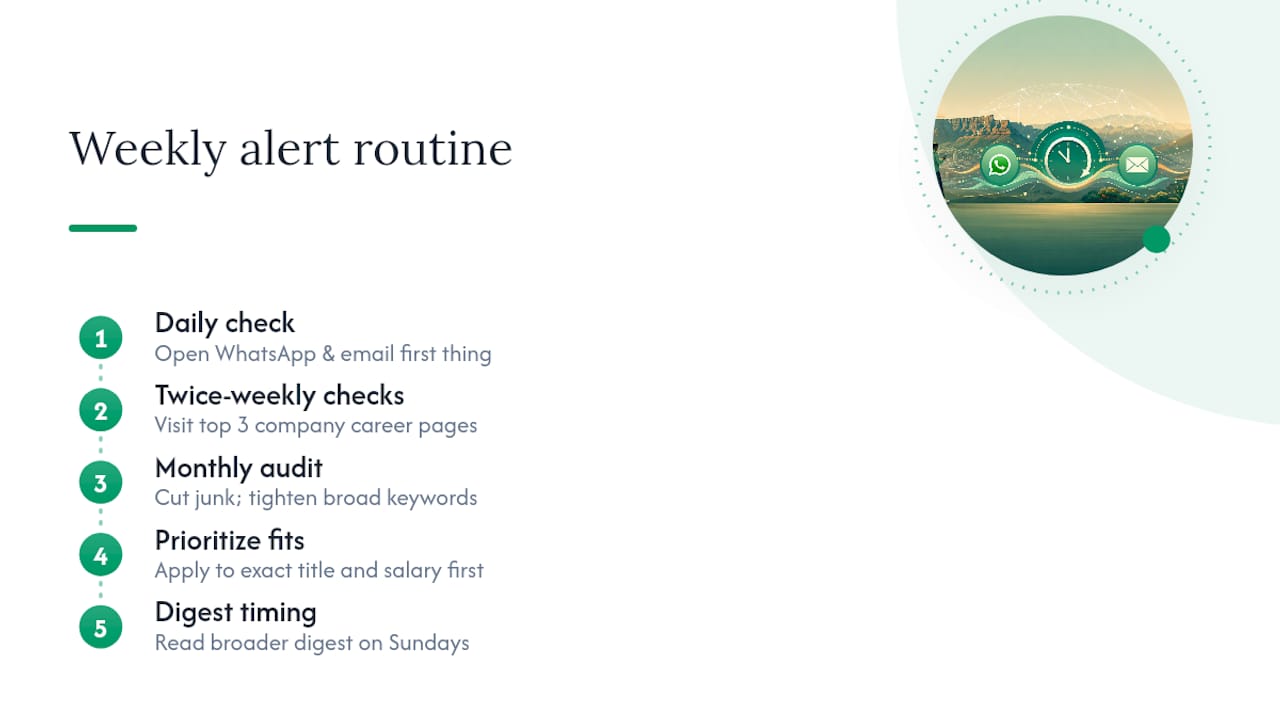
Here’s the routine that actually works: check your WhatsApp and email alerts first thing each morning, before anything else competes for your attention. Twice a week, manually visit the career pages of your top three target companies, since some of the best remote roles never hit an aggregator. Once a month, sit down and audit your alert keywords: cut anything returning junk, tighten anything too broad.
The hardest part isn’t setting up alerts. It’s resisting the urge to apply to everything the second it lands. Prioritize roles that match your exact title and salary floor first, and treat the broader digest as a Sunday-afternoon read, not a Monday-morning scramble. Speed matters, but a rushed, generic application to the wrong-fit role wastes the very advantage a fast alert gave you.
— Nkosi
Get FindJobsZA’s remote job alerts working for you today
This platform offers a direct option for South African job seekers who want the layered alert strategy this guide describes without building it themselves from multiple tools. Instead of juggling separate email filters, a WhatsApp bot, and manual career-page checks, users get real-time WhatsApp updates every morning combined with instant browsing by city or job type, no CV upload and no account required.
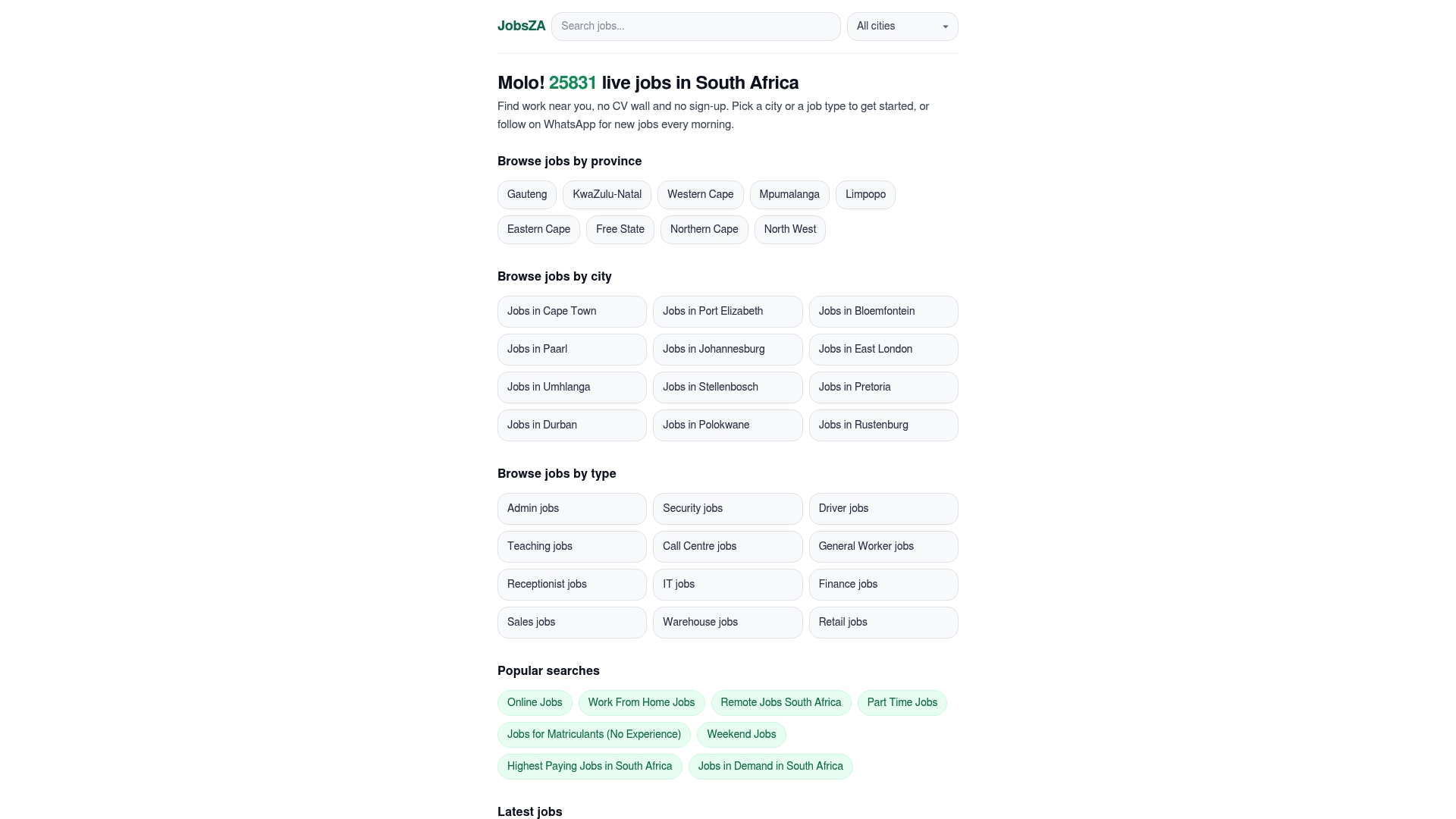
That combination solves the exact problem most job seekers run into: too many disconnected alert sources, not enough signal. Turn on WhatsApp updates, browse the remote jobs section to see what a tight daily alert should look like, and start applying to fresh listings the same morning they go live.
Sources
- Remote-jobs
- linkedin-job-alerts
- WhatsApp for HR & Recruitment: 2026 Hiring Playbook | WABA NXCMSG - WhatsApp Business API Platform
- How to Set Up LinkedIn Job Alerts That Actually Surface the Right Roles
FAQ
What is the most legit site for remote jobs?
There’s no single universally “most legit” site, but platforms that require no CV upload or sign-up to browse, like FindJobsZA for South African listings, tend to have fewer barriers hiding scam postings behind paywalls or data-harvesting forms.
How do you create a job alert?
Pick a job board or platform, search your exact job title with “Remote” as the location, then save that search as an alert with your preferred frequency, daily for tight matches and weekly for broader ones.
What are some remote jobs in South Africa that pay in US dollars?
Roles in software development, customer support for US-based companies, virtual assistance, and content writing frequently pay in US dollars when the employer is based abroad; these listings typically appear under general online jobs or remote job categories.
Does Amazon really pay people to work from home?
Amazon does hire remote workers for customer service, virtual assistant, and corporate roles, but these listings appear on Amazon’s own careers page and verified job boards, not through unsolicited messages or third-party sites promising guaranteed hire.
Recommended
Start with your city.
31 221 live jobs, filtered by city and suburb. No sign-up wall, no CV upload just to look.