Yes, you can find and apply for jobs using just your phone
25 August 202610 min read

Contents10 sections
- 1Key Takeaways
- 2Table of Contents
- 3Which mobile job search channels actually work?
- 4How do you prepare and apply for jobs from your phone?
- 5How do you spot a fake job listing on your phone?
- 6How can you job search on a limited data budget?
- 7How does Findjobsza help you search for jobs on mobile?
- 8Sources
- 9FAQ
- 10Recommended
Yes, you can find and apply for jobs using just your phone
You don’t need a laptop. Yes, you can search for and apply to most jobs using nothing but a smartphone, and for entry-level, retail, and hospitality roles, it’s often faster than any other route. The quickest paths are WhatsApp and SMS for frontline vacancies, and job apps or mobile-optimized sites for broader, ongoing searches. South Africa had roughly 127 million mobile connections by the end of 2025, and most of them are broadband-capable. That’s the infrastructure. The bigger question is which channel fits the job you want.
- Frontline and retail jobs: WhatsApp or SMS, often via a QR code or keyword
- Skilled or remote roles: job apps with saved searches and alerts
- Corporate positions: mobile-optimized career sites, sometimes requiring document uploads
- Uncertain what fits: a platform like Findjobsza that pushes daily listings straight to WhatsApp
Key Takeaways
Mobile job searching works best when you match the channel (WhatsApp, SMS, apps, or mobile sites) to the job type and keep your documents ready to send at any moment.
| Point | Details |
|---|---|
| Match channel to job type | Use WhatsApp and SMS for frontline roles, apps and mobile sites for skilled or remote positions. |
| Prepare documents once | Scan IDs and certificates with a tool like Adobe Scan, name files clearly, and store them in one folder. |
| Verify before you apply | Check company career pages, look for WhatsApp Business ticks, and avoid listings that ask for money upfront. |
| Use low-data routes when needed | SMS keyword applications and QR-to-WhatsApp flows work without a data plan or a new phone. |
| Try a no-sign-up platform | Findjobsza lets you browse by city or job type and delivers daily listings via WhatsApp with no CV upload required. |
Table of Contents
- Which mobile job search channels actually work?
- How do you prepare and apply for jobs from your phone?
- How do you spot a fake job listing on your phone?
- How can you job search on a limited data budget?
- How does Findjobsza help you search for jobs on mobile?
- Sources
- FAQ
Which mobile job search channels actually work?
Not every channel suits every job, and picking the wrong one wastes time you don’t have. Here’s how the four main routes stack up.
Job search apps give you filters by location, salary, and job type, plus push notifications when something matching your criteria goes live. They work best for skilled, professional, or remote positions where you’re competing on qualifications rather than speed. Set alerts the moment you install one. Waiting to “browse later” is how good listings get missed.

Mobile career sites are sometimes unavoidable. Larger corporates still route applications through their own portals, which usually means forms, document uploads, and sometimes an assessment. These sites are rarely built for phones, so expect some pinching and zooming. Budget extra time.

WhatsApp hiring has become the dominant channel for retail, hospitality, and other frontline work. Employers post a QR code in-store or online; scanning it opens a chat that screens you in minutes rather than days. This approach cuts data costs and speeds up screening dramatically compared to traditional applications, according to reporting on WhatsApp recruitment platforms. Employers are also moving away from social media as a primary hiring source. Traditional job sites and referrals now outperform social platforms, which dropped to just 9.3% of successful hires in 2026, down sharply from prior years.
SMS and USSD matter for basic-phone users. Capitec, for example, lets candidates text a keyword to a short code to start an automated application process, no smartphone or app required.
- Match the channel to the job type, not the other way around
- Use apps for ongoing searches, WhatsApp for immediate frontline openings
- Treat social media posts as a lead to verify, not an application channel
Pro Tip: Save the WhatsApp Business numbers of two or three companies you’d actually want to work for. Many post new roles there before they hit any job board.
How do you prepare and apply for jobs from your phone?
A compact, phone-ready CV beats a polished one sitting on a desktop you can’t access. Build it once, save it properly, and you’re ready the moment a vacancy appears.
Keep the CV itself short: your name and contact details, a two-line summary of what you do, your top five skills, and your three most recent roles or qualifications. Anything longer gets skimmed on a small screen anyway.
- Draft it in Google Docs or Word mobile so it syncs automatically and you can edit it anywhere.
- Design a cleaner version in Canva if you want something visual, using a mobile-friendly template.
- Scan your ID and certificates with Adobe Scan rather than photographing them. Scanning apps crop, straighten, and compress automatically, which matters because a 15MB photo can fail to upload on slow data. Guides on applying for learnerships by phone walk through this exact workflow.
- Name your files clearly: “Jane_Nkosi_CV.pdf”, not “IMG_4021.jpg”. Recruiters skim file names before they open anything.
- Write one short cover message you can adapt in seconds for one-tap apply flows. Two or three sentences on why you’re a fit is enough.
- Log every application in a notes app or a simple spreadsheet on your phone: company, role, date, and how you applied. Follow-ups are far easier when you’re not relying on memory.
Pro Tip: Keep your scanned documents in one phone folder named “Job Applications” so you’re never digging through your camera roll under pressure.
How do you spot a fake job listing on your phone?
Scams follow a pattern, and once you know it, most fake listings are easy to spot in seconds. Watch for:
- Upfront payment requests for training, uniforms, or “processing fees” before any interview
- Job offers with no interview at all, especially for well-paid roles requiring no experience
- Requests for bank details or your ID number before you’ve had any real screening conversation
- Pressure tactics: “reply within the hour or the position is gone”
Before applying, verify. Check the company’s own careers page or call a listed office number directly rather than the number in the message. On WhatsApp, look for the green verification tick that confirms a genuine WhatsApp Business account. Ask for an HR contact’s email address and cross-check the domain against the company’s official website.
Rising recruitment fraud on social media is a documented problem, and analysts consistently recommend sticking to verified platforms rather than unsolicited posts or messages. If a listing feels off, Scruteon’s free scam-checking service will tell you whether it matches known fraud patterns before you hand over anything personal.

How can you job search on a limited data budget?
Data cost, not phone quality, is the real barrier for most job seekers. Broadband coverage across South Africa is high, but that doesn’t mean data is affordable for everyone, so a WhatsApp-first strategy usually beats scrolling job boards.
- Prioritize WhatsApp and SMS over data-heavy apps or sites with autoplay video
- Turn on “data saver” or disable images in your browser when browsing job listings
- Save job descriptions and CVs as PDFs so you can review them offline
- Use SMS keyword applications where available, the same way Capitec candidates text a code to 33004 to start an application with no data at all
- Scan in-store QR codes at retailers, which usually route straight into a WhatsApp screening chat
- Track applications in your phone’s default notes app rather than installing another tracker
None of this requires a new phone or a bigger data plan. It just requires picking the channel that matches your device and your budget.
How does Findjobsza help you search for jobs on mobile?
Findjobsza was built around the reality that most South African job seekers are searching on a phone, often with limited data, and don’t want to create an account just to see what’s available.
- Browse listings by city, province, or job type with no CV upload and no sign-up
- Get daily WhatsApp job alerts delivered every morning, so new vacancies reach you without opening an app
- Search by category, including remote roles, part-time work, and weekend jobs
- Apply directly to listings without repeating the account-creation step other platforms require
That maps directly onto the workflow this article walks through: prepare your documents once, then let the right channel bring the vacancies to you instead of chasing them across five different apps.
A mobile hiring perspective from Findjobsza
Data cost, not motivation, keeps a lot of qualified people out of the hiring process. Mobile-first platforms close that gap by meeting job seekers where they already spend their data: WhatsApp, SMS, and quick mobile browsing. Findjobsza’s no-sign-up, alert-based model reflects that reality directly. Use the checklist above, and let the listings come to you.
— Nkosi
Start browsing jobs on your phone today
Findjobsza skips the parts of job hunting that waste your time on a phone. No CV upload before you even know if a role suits you, no account to create, no forms to fight with on a small screen. You browse by city or job type, and new listings land in your WhatsApp chat every morning instead of you refreshing five different apps.
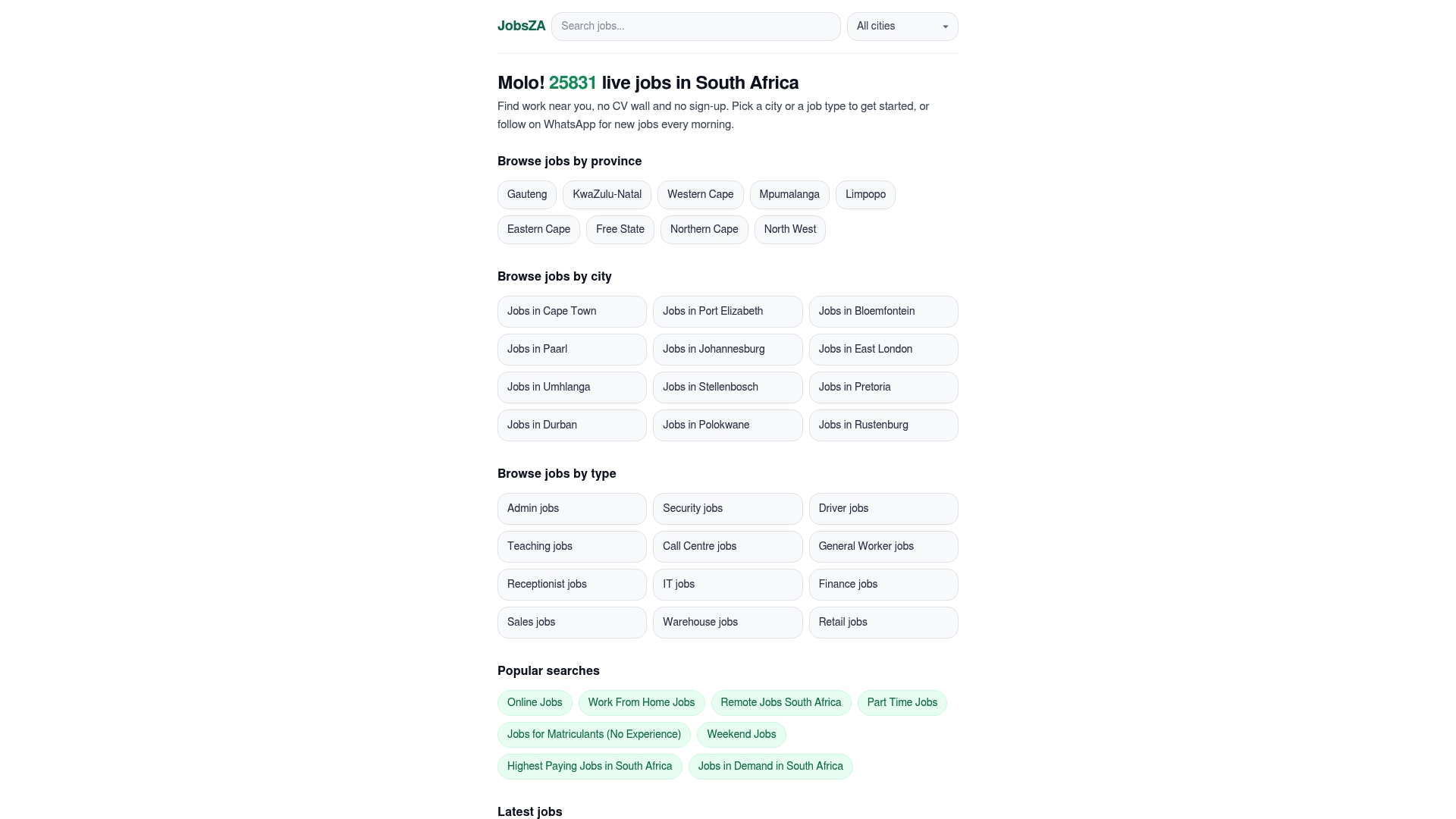
If you’re after flexible work you can do around other commitments, check the part-time listings or weekend jobs pages. Prefer to work from home entirely? The remote jobs category updates daily. Open the site now, pick your city or category, and see what’s listed this morning.
Sources
- Social media is proving less valuable when finding a job - Hypertext
- WhatsApp platform offers easier access to jobs - IOL Business Report
- Digital 2026: South Africa - DataReportal
FAQ
Can I get a job on my phone?
Yes. Most job search steps, from browsing listings to submitting a CV and following up, can be done entirely on a smartphone, especially through apps, mobile-friendly sites, or WhatsApp hiring flows.
How do I get a job immediately in South Africa?
Frontline and entry-level roles move fastest through WhatsApp or SMS channels, since employers in retail and hospitality often screen candidates within a chat rather than a formal application process. Platforms like Findjobsza also push new listings daily via WhatsApp, so you see openings the same morning they’re posted.
Are there vacancies at SASSA I can find on my phone?
SASSA vacancies are posted through official government channels and the Department of Public Service and Administration, so always confirm any listing against SASSA’s own site or a verified job platform before applying, since fake public-sector listings are a common scam pattern.
Which app is best for finding a job?
The right app depends on the job type: broad job boards suit skilled and remote searches, while WhatsApp-based flows suit retail, hospitality, and frontline roles. Findjobsza works well for either case since it combines category browsing with no-sign-up applications and daily WhatsApp alerts.
Is WhatsApp job hunting safe?
It can be, provided you verify the account has a WhatsApp Business checkmark and never send bank details or ID numbers before a real screening step. Legitimate employers won’t ask for payment or sensitive financial information to “confirm” your application.
Recommended
Start with your city.
23 440 live jobs, filtered by city and suburb. No sign-up wall, no CV upload just to look.