Job Alert Filters: Set Them Up So Only Relevant Jobs Reach You
1 November 202614 min read

Contents17 sections
- 1TL;DR
- 2Table of Contents
- 3What job alert filters actually do
- 4The five filters worth setting first
- 5Combining keywords: the simple Boolean rules
- 6Several narrow alerts beat one wide one
- 7Filters for different kinds of job seekers
- 8Frequency: how often should alerts arrive?
- 9How to tell your filters are wrong
- 10Filters across different platforms and devices
- 11A note on safety when you set up alerts
- 12Our perspective
- 13Set up your search on FindJobsZA
- 14A 10-minute setup you can do today
- 15FAQ
- 16Sources
- 17Recommended
Job Alert Filters: Set Them Up So Only Relevant Jobs Reach You
A good job alert does one thing: it sends you the vacancies you would actually apply for and nothing else. The filters decide that. Set the location tight, the job title specific and the job type honest, and your phone becomes a daily shortlist. Set them loosely and it becomes noise you start ignoring within a week. This guide shows which filters matter for South African job seekers, how to combine them, and how to adjust them when the alerts go wrong.
TL;DR
- Start with three filters: job title (or category), location (city or province) and job type (full-time, part-time, freelance, entry-level).
- Use a specific title, not a broad word. “Debtors clerk” beats “finance”, and “forklift driver” beats “logistics”.
- Run two to four narrow alerts instead of one wide one, so each covers a different title or area.
- Review your alerts after two weeks: too many irrelevant jobs means tighten, too few means widen one filter at a time.
- Never pay to receive alerts or to be “shortlisted”. Legitimate work-seeker services are free.
Table of Contents
- What job alert filters actually do
- The five filters worth setting first
- Combining keywords: the simple Boolean rules
- Several narrow alerts beat one wide one
- Filters for different kinds of job seekers
- Frequency: how often should alerts arrive?
- How to tell your filters are wrong
- Filters across different platforms and devices
- A note on safety when you set up alerts
- Set up your search on FindJobsZA
- A 10-minute setup you can do today
- FAQ
- Sources
What job alert filters actually do
A filter is a rule that a vacancy must meet before it reaches you. Every job board and alert service builds its alerts from the same handful of rules, even when the names differ:
- Keyword or job title: the words that must appear in the vacancy.
- Location: a city, a town, a province or, on some services, a radius around a point.
- Category or industry: sales, retail, admin, finance, logistics and so on.
- Job type: full-time, part-time, contract, freelance, internship or entry-level.
- Salary: a minimum bracket, on services where employers publish pay.
- Work arrangement: on-site, hybrid or remote.
- Frequency: instant, daily or weekly delivery.
Not every service offers every filter, and the controls differ between websites and apps, so check what yours actually provides before building a plan around a filter that is not there. The principle is the same everywhere: each filter you add removes jobs, so add only those that remove jobs you would never take.
The five filters worth setting first
1. Job title or category
This is the filter with the biggest effect. Broad words pull in everything loosely connected to them. A search for “admin” returns receptionists, data capturers, personal assistants and office managers. If you want one of those, say so.
A practical way to choose your words: open three vacancies you would happily apply for and note the exact titles used. Employers repeat the same titles, and those are the words your alert should match. Then list one or two close variants. A person looking for retail work might use “cashier”, “sales assistant” and “store assistant”, because different retailers name the same role differently.

2. Location
Location is where South African alerts most often go wrong. Gauteng alone covers Johannesburg, Sandton, Midrand, Randburg, Germiston and Alberton, and a daily commute between them can be long and expensive. Decide what you can realistically reach.
- No transport of your own: choose one town or suburb and the ones on your taxi or train route, not a whole province.
- Willing to relocate: use the province filter and expect more results.
- Remote only: set work arrangement rather than location, and read our guide to remote job alerts that work via WhatsApp and email.
If you are not sure how to narrow by area, the walkthrough on how to search jobs by province shows the steps, and the page on city job alerts in South Africa explains how local alerts work.
3. Job type
Be honest about what you can take. A student needs part-time or weekend work. A freelancer wants short gigs. A graduate wants entry-level roles that do not ask for five years of experience. Setting job type early removes the most frustrating kind of alert: the one that matches your title but not your situation.
4. Experience level
Many vacancies state a number of years required. If you are a recent graduate, include words such as “entry level”, “junior”, “graduate”, “trainee” or “internship” in your keywords. If you are senior, add “manager”, “supervisor” or “head” to cut out junior listings.
5. Salary, where published
Some services let you set a minimum salary bracket. Use it carefully. Many South African vacancies do not publish pay, so a high minimum can hide good jobs that simply do not list a figure. If your alert goes quiet after you add a salary filter, remove it and judge pay when you read the advert.
Combining keywords: the simple Boolean rules
Some services let you type operators into the keyword box. They are worth learning because they take two minutes and make alerts far more accurate. The idea is described in guides to Boolean search: AND narrows a search, OR widens it, NOT excludes a word and quotation marks match an exact phrase. Support varies from service to service, so test a search before you save it as an alert.
Here are examples for common South African job searches:
| Goal | Keyword idea | What it does |
|---|---|---|
| Cashier work, not management | cashier OR “sales assistant” NOT manager | Matches either title, hides manager roles |
| Driver jobs that need a specific licence | driver AND “code 10” | Both terms must appear |
| Admin work, not call centre | “admin clerk” NOT “call centre” | Exact phrase, excludes one environment |
| Entry-level finance | (junior OR graduate OR trainee) AND finance | Any seniority word plus the field |
| Remote customer service | “customer service” AND remote | Both must be present |
If a service does not support operators, you can still get most of the benefit by using one exact job title per alert and creating several alerts.
Several narrow alerts beat one wide one
A single alert with ten keywords and four towns is hard to tune. When it floods you, you do not know which part caused it. Separate alerts make problems obvious.
A sensible starter set for someone looking for logistics work in Gauteng might be:
- “Forklift driver” in Germiston.
- “Warehouse assistant” in Johannesburg.
- “Delivery driver” in Sandton.
- “Stock controller” across the province.
Each one tells you something. If the third gives nothing for two weeks, you know that combination is thin and can widen it. Two to four alerts is plenty for most people. More than that and you will stop reading them.
Filters for different kinds of job seekers
Students and part-time work
Use job type set to part-time, a location within walking or short-taxi distance of your campus or home, and keywords such as “weekend”, “holiday” or “temporary”. Retail, hospitality and call-centre roles often use these words. Check each vacancy for shift times against your timetable before applying.
Recent graduates
Filter by entry-level, junior or graduate wording, and drop the salary filter. Add the name of your qualification field, such as “finance”, “HR” or “teaching”, not only the job title, because graduate programmes are often titled “trainee” or “intern” rather than the role itself. People in education can follow local pages such as teaching jobs in Johannesburg, Midrand, Sandton and Randburg.
Freelancers and gig seekers
Gigs go quickly, so frequency matters more than precision. Choose the fastest delivery your service offers, use words like “freelance”, “contract”, “short-term” and “temporary”, and keep your location wide or set to remote. Respond within hours, not days.
Professionals looking at remote roles
Set work arrangement to remote or hybrid and leave location broad. Then use keywords to protect yourself from vague listings: add your specific skill, not just “remote”.
Frequency: how often should alerts arrive?
Instant alerts suit fast-moving roles such as retail, driving and temporary work, where employers fill positions quickly. Daily alerts suit most people: one digest, read at a set time, with no constant interruptions. Weekly alerts suit passive searching, when you are employed and only want to see exceptional offers.
Daily is the best default. A morning delivery fits how most people search: you read the new vacancies before the day starts, apply while the advert is fresh, and are not pulled out of work by pings. Whatever you pick, find the pause or unsubscribe control the first day, so you know how to stop alerts when you start a new job or need a break.

How to tell your filters are wrong
Check your alerts after two weeks and note what you see.
| What you notice | Likely cause | Fix |
|---|---|---|
| Dozens of alerts, most irrelevant | Keyword too broad | Use an exact title, add NOT words |
| Jobs far from home | Location or radius too wide | Narrow to a town or suburb |
| Same job repeated | Overlapping alerts | Merge or separate them by title |
| Nothing for weeks | Too many filters stacked | Remove salary first, then job type |
| Senior roles when you want entry-level | No experience wording | Add “junior”, “graduate” or “trainee” |
Change one filter at a time. If you change three, you will not know which fixed it.
Filters across different platforms and devices
Expect differences. Some websites let you build alerts only after you create an account, and some apps hide filters behind a settings menu while the website shows them on the results page. Mobile screens often show fewer filter options than a desktop view. If a filter you need is missing in the app, try the same service in your phone browser, or on a computer, set the alert there and let it deliver to your phone.
Also check how each service delivers: email, app notification or WhatsApp. Email is the easiest to organise, WhatsApp the quickest to see, and app notifications the easiest to mute by accident.
A note on safety when you set up alerts
Alerts are only useful if you trust them. South Africa’s Department of Employment and Labour has warned work seekers against paying fees or sharing personal information with fake recruiters, and it points to the Employment Services Act, under which no person may charge a work seeker a fee for employment services. Apply that rule to every alert you receive:
- A real alert never asks you to pay to see a vacancy or to be placed.
- Be cautious when a message asks for ID copies, banking details or a deposit before any interview.
- Use only services you chose yourself, not unknown numbers that added you to a group.
We cover how to join alerts safely in more detail in our guide on how to opt in to job alerts.
Our perspective
We built FindJobsZA because most job seekers we think of do not fail for lack of effort. They fail because the search itself is exhausting: create an account, upload a CV, tick twelve boxes, and then receive a flood of listings that do not fit.
Our view is that filters should be simple and local. Pick your city or province, pick your job type, and see what is open. That is why you can browse by city, province or category without uploading a CV or registering, and why we send new listings by WhatsApp every morning.
We think the daily rhythm matters as much as the filter. A short list of fresh vacancies in the morning, in an app you already use, is easier to act on than a weekly email you open once. Pair that with two or three precise searches and you spend minutes, not hours, on your search.
Good filters are not about seeing more jobs. They are about seeing the right ones before someone else applies.
Nkosi
Set up your search on FindJobsZA
FindJobsZA lists vacancies across South Africa that you can browse by city, province or job type, with no CV upload and no sign-up, and it offers new listings by WhatsApp each morning. Our categories include sales, retail, customer service, admin, logistics, driver, human resources and finance jobs. Using the filters in this guide, you can go straight to the local pages that match your plan.
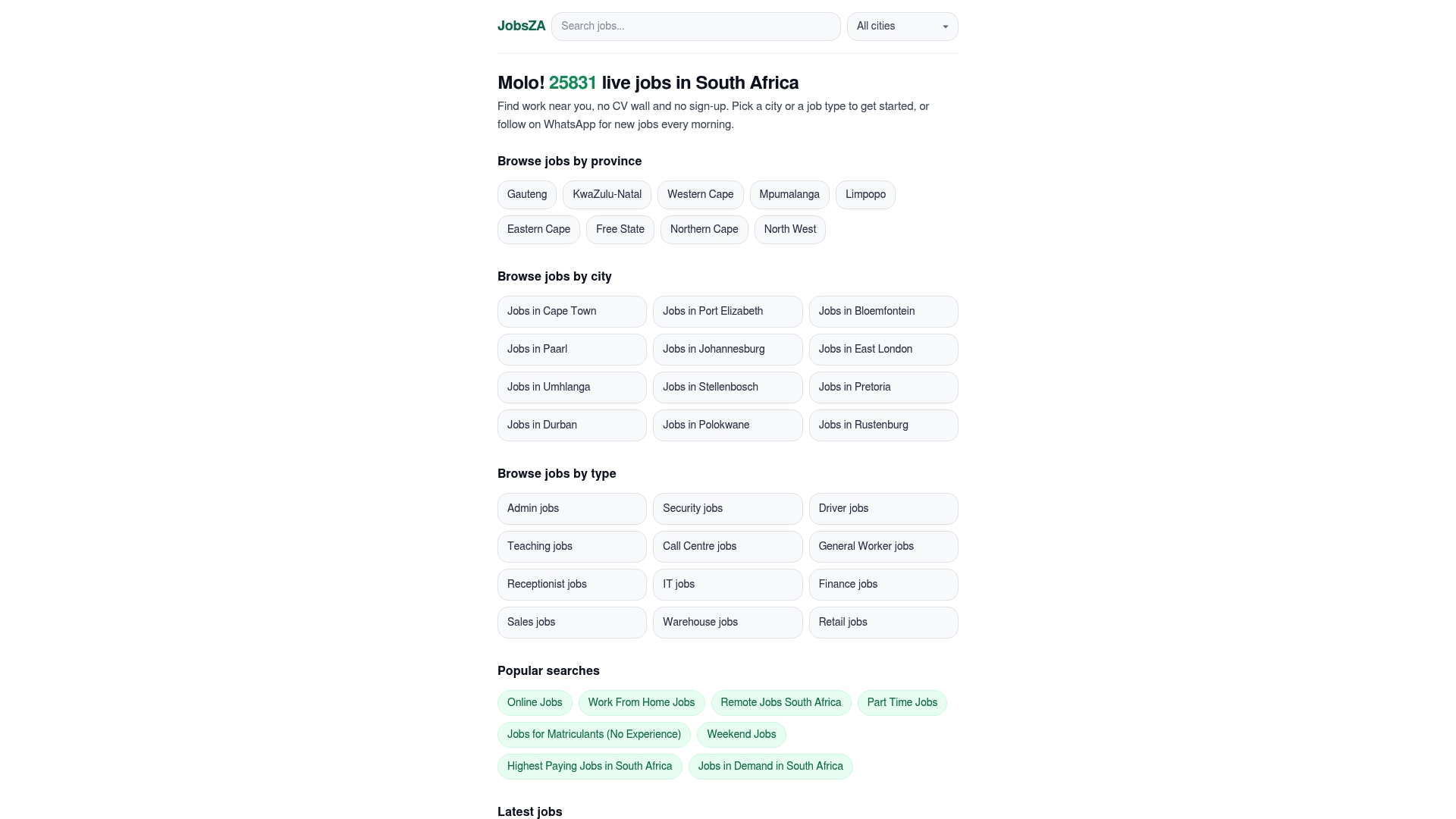
Start on the FindJobsZA homepage and choose your category and area. Examples of local pages include retail jobs in Germiston, logistics jobs in Johannesburg, sales jobs in Jeffreys Bay and retail jobs in Tzaneen. Vacancy counts change daily, so open the page to see what is live today.
A 10-minute setup you can do today
- Write down the exact titles of three jobs you would take.
- Choose the one or two towns or suburbs you can reach every day.
- Decide your job type: full-time, part-time, freelance or entry-level.
- Create two to four narrow alerts, one per title and area.
- Choose daily delivery, and note where the pause control is.
- Apply to anything that fits within a day of seeing it.
- After two weeks, adjust one filter at a time.
Keep a simple note on your phone with the alerts you have created and the date. When one never produces a useful job, delete it and replace it with a different title. A search that is tuned every fortnight keeps working. One that is set once and forgotten usually does not.
FAQ
What are the most important job alert filters?
Job title, location and job type do most of the work. Get those three right before you add salary or experience filters. Each extra filter hides more jobs, so add one only when you are sure you would never take what it removes.
How many job alerts should I create?
Two to four is a good number. Give each a different title or area so you can see which one produces useful results. Too many overlapping alerts bring repeat vacancies and make it hard to see what to change.
Why am I getting jobs that do not match my search?
Usually the keyword is too broad, or the location covers more than you intended. Use an exact job title, add words you want excluded if your service supports it, and narrow the area to your daily travel range. Change one thing at a time and check again after a week.
Do I need a CV or an account to get job alerts?
It depends on the service. Many require an account and a profile. On FindJobsZA you can browse by city, province or job type without uploading a CV or signing up, and you can receive new listings on WhatsApp each morning.
How do I stop or pause job alerts?
Look for an unsubscribe or pause option in the email, app settings or WhatsApp chat that delivers the alerts. Locate it when you first subscribe so you can stop messages when you find work. If a service makes stopping difficult, treat that as a warning sign.
Sources
Recommended
Start with your city.
32 563 live jobs, filtered by city and suburb. No sign-up wall, no CV upload just to look.